| Official Gadgeteer Hands On
Review: Psion Series 5mx by Richard W. Parker Last date revised: 08/29/99 |
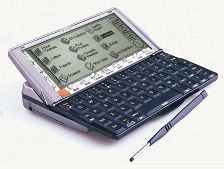
I have noticed that there is still no mention of the new 5mx machine from Psion, so wanted to offer my own brief review of it. There are several excellent reviews already available that go into extreme detail about the specific differences from the Series 5, so I am not going to cover this material. See the 5alive.psionking.com site for that info.
 *
*
In summary, the 5mx is twice as fast, has 16MB internal memory (twice the memory), and has
updated applications including: email, web browsing, jotter, sorting in the spreadsheet,
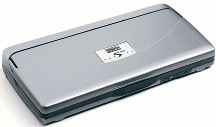
outline view in the word processor, and a stylish (IMHO) silver-grey case. The basic
form factor is unchanged from the 5. You can download JAVA to it as well from the
included CD.
I used to be a Newton user, then switched to the Pilot for basic organization capabilities
when the Newton was discontinued. I realized after a few months of use that I was
really looking for a significantly more capable machine than the Pilot, so began a
detailed review of the options. As luck would have it, the 5mx had just been
announced by Psion.
I spent over a month thoroughly researching its capabilities (something that I recommend
to anyone who is considering the purchase of a gadget that is supposed to assist them it
all aspects of their mobile life). I read all the web sites, all the reviews
(including the excellent Gadgeteer site), and perused all the software that is
available. There were a few things that particularly impressed me about the device:
1) Operating Environment. EPOC32 is a mature OS with a nicely streamlined user
interface. The UI does not tend to get in the way of getting work done. It
multitasks, and task switches nearly instantaneously.
2) Robust Applications. Each of the built-in applications seem more like their
desktop counterparts than 'watered-down' pocket versions. The word processor supports
style sheets, imbedded graphics, and even spreadsheets/graphs; the built-in email app
supports multiple mail boxes; the agenda program supports imbedded graphics and very
flexible scheduling.
I don't feel that I am making a significant compromise in doing work remotely with the
device.
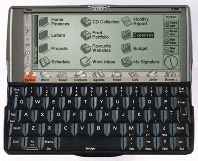
3) Hardware/Form-Factor. The Psion 5mx has the nicest keyboard of any device in its
class. I can actually touch-type at 40-50 WPM on it. The display is decent (not the
best in its class, but perfectly usable) -- and is supported by the special hinge
mechanism (so tapping on it doesn't tip the machine over). The pen is ergonomically
shaped and weighted. It has a Mercedes-like feel to it from an engineering
perspective. Definitely not just another 'clamshell HPC'.
4) Software Availability. There is a tremendous following of developers for the
Psion (many of which are located in the UK). I have had no trouble locating
applications for all of my needs. Much of the software is even freeware or
shareware. For business-oriented people, there are project management applications,
presentation programs (that display/edit PowerPoint!), financial programs, and
others. In the entertainment category, there is a huge amount of shareware games
available including SimCity(tm), Defender, and other well-known games; there is also a
Spectrum emulator that runs the 4000+ program library of 8-bit games at full speed.
5) Global "Zoom". This one really surprised me. In all of the
built-in applications (even the System app), and in many of the 3rd party apps, you can
scale the onscreen text/graphics between four different levels. This zooming does
not affect printed output -- it is mainly for ease of editing/navigation. It works
nearly instantaneously and is TREMENDOUSLY useful in getting real work done. For
instance: I am able to zoom way in on the word processor and see very clearly what I am
typing, then zoom out for full page width display (the display is 640 pixels wide) in
order to properly format paragraphs and move things around.
6) Battery Life. I am still using the two AA batteries that came with the
unit. I have had over 20 hours of on-time (with 5%-10% of that backlit), and still
show about a 60% battery level. It should also be noted that I have spent a
considerable amount of that initial 20 hours using the serial port (to transfer software
and documents to it) and the IR port (to print to the HPLJ5MP laser printer at my office).
7) Emulator. There is a freely-available EPOC32 emulator for the PC. This was
a very nice way for me to be able to really try out the built-in applications before I
purchased the machine. I entered sample agenda items and contacts, played with the
word processor and spreadsheet, and navigated the system program for example. You can find
this emulator at http://www.epocworld.com/.
Registration is required but it is free and fast.
8) Macintosh Support. While not as robust as its PC counterpart, Psion does provide
an optional Mac connection package. It includes the cable adapter and software for
performing backups, installing software, and even mounting the Psion 'disks' on the
desktop for complete finder integration. I routinely drag-and-drop documents between
the Psion and my Mac. For these simple operations, the Mac connect package works
very seamlessly and elegantly.
Of course, there have been a few things that annoy me as well:
1) You have to use the pen (or a fingernail if you are brave) to launch any of the
applications. It would be nice if there were keyboard shortcuts for at least the
built-in apps. You can, however, download freeware macro programs that offer this
functionality.
2) Lack of categories in the Agenda and Contacts programs. You can have separate
Agenda files, but I prefer to view all my schedules at once. You cannot have multiple
contact files.
3) No PC-Card slot. There is a CompactFlash slot for memory expansion (I have an
80MB card in mine!), but there is no support for PC Cards. You can purchase a PC
Card adapter that allows the use of modem cards, but there is no support for Ethernet
cards and other such devices. I miss this from my Newton, where I could connect to my
office Ethernet directly and check email/synchronize REALLY fast.
Despite these relatively minor shortcomings, I have found the Psion Series 5mx to be the
closest thing to an ideal mobile digital companion as is currently available.
Pros
Excellent keyboard
Decent display (640x240x16 greys)
Excellent industrial design
Excellent and mature OS (I have yet to need to reset my machine for any reason)
Decent built-in applications
Excellent battery life (25-30 hrs continuous with 2 AA Duracell Ultra batteries)
Decent memory and expandability (CF slot)
Decent connectivity and desktop compatibility (Mac and PC)
Decent speed and responsiveness
Lots of 3rd party software and developers
JAVA support
Built-in programming language
Infrared port for printing/beaming
VCard compatible contacts app
Cons
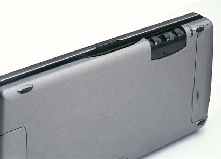
Somewhat fragile opening mechanism
No PC-card slot or built-in modem (Psion does have an external PC card adaptor that
connects serially)
Not color (I don't see this as a major con personally, but some do)
No categories in Contacts
| Let me know your comments on the Psion
Series 5mx and read what others have to say. |
* Pictures are from the 5alive.psionking.com site.