| Official
Gadgeteer Hands On Review: MPIO-DMG
Digital Music Player by Julie Strietelmeier Last date revised: 03/13/2002 |
Product Requirements:
Device:
Pentium 133MHz or faster
Windows 98/SE/ME/2000/XP/Mac OS
USB port
CDrom
I've had a fascination with music since I came into this world. I have some fond memories of listening to a transistor radio late at night under the covers, of my sister and I spending Sunday afternoons taping our favorite songs off Kasey Casem's American Top 40 with a tape recorder microphone held up to the radio speaker, and of trying to pick song melodies out on my guitar. It stands to reason that being the gadgeteer that I am, that I'd eventually merge my love of music with my love of technology. That's one reason why I love Pocket PCs, I can fill up a CF or SD card and listen to music whenever I want. Of course, Pocket PCs suffer from battery life issues, sometimes don't have the greatest sound fidelity and let's face it, even the smallest PPC can be bulky when all you want to do is just listen to tunes. So, I've been on a crusade to find the smallest most feature filled MP3 player available.
My first find is the MPIO-DMG Digital Music Player from digita@lway which is available in 32, 64 or 128MB internal memory versions and in 3 colors choices: Silver, Blue and Gold.
Hardware Specs:
Digital Audio Format: MP3, WMA, AAC (option)
Internal Built Memory: 32/64/128 MB Flash Memory
External Memory Expansion: Smart Media Card (SSFDC)
Host Interface: USB 1.1 (4Mbps file transmission speed)
LCD with blue back-light: FSTN, 30 x 30 (mm) size, 128 x 48 pixel
Voice Recording Function
LCD Fonts: All languages displayed
Power: 1 AA battery (1.5V) (~ 20 Hours Playing Time)
Size : (W x H x D): 2.66 x 2.66 x 0.72 inches (68 x 17 x 68mm)
Weight: 3.2 oz with battery
The MPIO has quite a few features crammed into a package that is small enough to fit in any pocket or gear bag. Besides playing MP3s, it is also a voice recorder and can double as a digital camera with an optional attachment (sold separately).
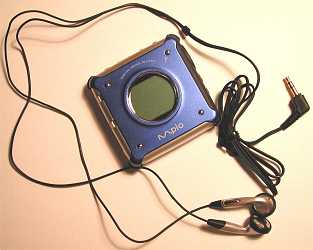
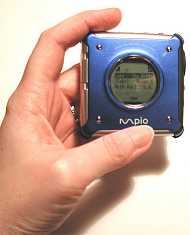
Made of plastic and aluminum, the MPIO feels very solid and well built. The casing doesn't flex, creak or crack during use.
The face of the player has a nice sized round LCD in the middle which is easy to read due to a nice blue backlight. This backlight will shine for 5 seconds or so before turning off. Pressing any button will cause it to turn on again. When the backlight is off, the display is similar to the black on green LCD of a mono Palm PDA. The LCD can display 3 lines at time. For the most part, you'll be using the display to scroll thru the songs stored in internal or external memory. While a song is playing, the name, and timer are displayed. I really like the LCD because it is easy to read and is big enough to display song title and time information while the song plays.
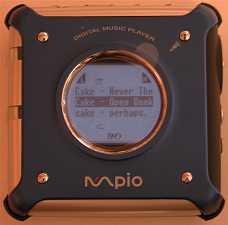
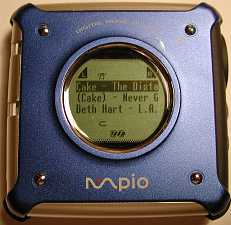
Also on the face of the player is a microphone for voice recording. More about that feature later.
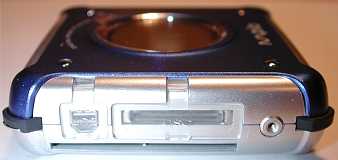
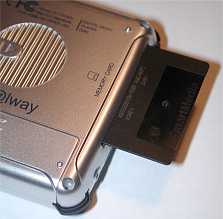
The left side of the MPIO has the USB connector, digital camera connector and Smart Media slot. Both connectors have soft rubber covers to keep dust and dirt out. SM cards slide easily into the slot and can be ejected by a slide button on the back of the player.
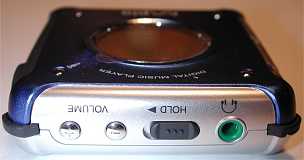
The top of the MPIO has the earphone jack, hold switch, and volume adjust buttons. The earphone jack is a typical stereo jack. The hold switch when slid to the on position, disregards all button presses so that you can't accidentally activate or change settings while listening to music. The volume buttons raise and lower the volume level by pressing either the + or - button. A level indicator will be displayed briefly on the LCD while you are performing the adjustments. The volume level can be set from 0 - 40. I tend to run it at 10-15 and find the volume to be more than loud enough. There's no way I could listen to it at a level of 30-40.
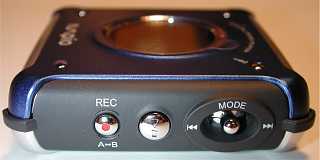
On the right side of the player is the mode button, power on/play/stop/power off button, and record button. The mode button is actually a little joystick that can be pressed up or down to do such tasks as moving to next or previous songs. Pressing the button in allows you to go into a setup mode where you can choose equalizer settings, repeat settings, memo pad viewing, file erase, and language settings.
For the equalizer, you can choose presets such as Normal, Pop, Rock and Classic. You can also pick the User setting which allows you to change the level of bass and treble.
The settings for repeat are:
Normal: Plays all stored files one at a time in order.
Repeat One: Repeat the current file.
Repeat All: Repeats all stored files.
Shuffle: Please the files in random order.
Intro: Plays the first 10 seconds of each file.
One unusual feature of the MPIO is the ability to list memos on the LCD screen. Using the desktop software you can save short memos on the player that can be viewed later. So for example, you could save important phone numbers and addresses. I'm not sure how useful this is due to the fact that the display is so small on the player, but the feature is there if you care to use it.
If you would like to erase one or all files on the player, you can use the erase feature. This is useful for deleting old voice recordings.
The other feature that is accessed thru the joystick is the Language setting for the onscreen menus. The available languages are: English, Korean, Japanese, Chinese, German, French and Spanish.
On the back of the MPIO is the SM eject slider and the battery compartment. This little player is great on batteries. It only takes 1 AA and it seems to last forever. When I had to send this unit back, it still had the first battery that I had installed since receiving the unit for review... and that was a couple months ago. I've listened to entire albums on more than one occasion, and have listened to multiple songs (usually 7-10 songs at a time) at least a half a dozen times during the review period.
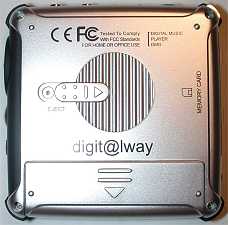
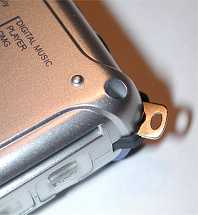
On one corner of the player there is a little metal slide out eyelet that you can attach an included hand strap if you desire.
Regarding the sound quality, I'm not going to pretend that I have the ear of an audiophile, but I do think that the MPIO sounds really good. I only have Pocket PCs to compare it with, and from what I can tell, the MPIO has a warmer bass and a more full bodied sound all around. There is a set of ear bud earphones included with the player that sound pretty good. I don't really care for ear buds though and tested the unit with headphones.
There are two ways to get music files into the MPIO. If you have a SmartMedia card, you can fill it up with music and insert it directly into the SM slot and you're good to go. Otherwise, you can use the included MPIO Manager desktop software and USB cable.
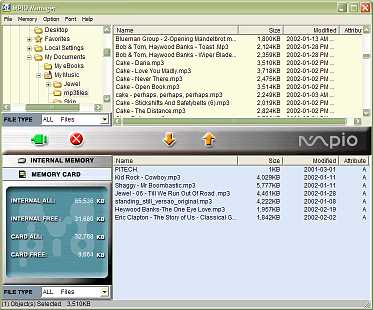
This is a really easy to use drag and drop type program. You can use the file manager to navigate to a folder on your PC that has MP3 files stored, and then drag them to the internal or external storage windows. File transfers are very fast thru the USB cable.
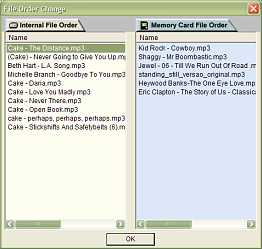
You can also change the play order of the songs by dragging and dropping.
I really like the MPIO-DMG and will be sorry to send it back. The size is fantastic, the controls are easy to use and understand and most importantly, the sound quality is great. The only things that would make this player perfect would be increasing the internal memory size and lowering the price. $219 for a 128MB version seems way too pricey to me.
Available thru DGN Depot.
Price: $139 (32MB version), $189 (64MB version), $219 (128MB version)
Pros:
Great size
Very good sound quality
Easy controls
Cons:
Expensive
| Let me know your comments
on the MPIO-DMG Digital Music Player and read what others have to say. Back to Main Page. |